Keyboard Emoji & Sound Themes
- 4.3
- Rating
- 1.00M
- Installs
- Free
- Price
 Analysis by App-foxy
Typing is one of those phone habits I rarely think about until the keyboard starts slowing me down. That is why I spent time with Keyboard Emoji & Sound Themes, a free personalization app from BUGUN SOFTWARE COMPANY LIMITED. Its basic idea is straightforward: give everyday typing a more expressive look through emoji, fonts, and themes. In practice, I found that its value depends less on decoration alone and more on whether you are willing to set up a comfortable routine around it.
The app is aimed at people who want their keyboard to feel less ordinary without replacing their entire phone interface. It is listed for everyone, works on devices running Android 8.0 or later, and its current version is 1.3.4. I would not describe it as a productivity keyboard first. I see it more as a visual and expressive layer for messages, comments, captions, and casual conversations.
How the everyday typing workflow feels
The first useful way to judge this app is to ignore the themes for a moment and ask a simple question: can I type normally after setting it up? For me, that meant using it in short messages, longer notes, search fields, and social posts rather than judging it from a preview screen. A keyboard can look attractive and still become irritating if the keys feel crowded or if switching away from it becomes inconvenient.
You May Also Like

 Blood Strike: 2.5 Anniversary
Blood Strike’s Loadouts Turn Every Drop Into a Tactical Gamble
A close look at Blood Strike’s custom loadouts: how fast access to signature weapons reshapes its battle royale rhythm, rewards preparation, and narrows the gap between fights.

 Pandora - Music & Podcasts
Pandora’s Music Is Easy to Start, but Harder to Recover
Pandora’s strength is its low-effort path from a seed to a station. Its weak spot is how much confidence it asks you to place in connection, setup, and quiet recovery.

 8 Ball Pool
 Is Built on Rivalries, Rematches, and Routine
A close look at the rivalries, rematches, shared routines, and unanswered safety questions that turn a quick pool match into a persistent mobile community.

 Samsung Music
’s Quiet Strength Is Playing What You Already Own
Its reach comes less from spectacle than from dependable access to a personal library. That simplicity is both the app’s strongest retention engine and its ceiling.

 AccuWeather: Weather Radar
AccuWeather Review: A Quick, Clear Forecast for Everyday Decisions
For everyday plans, the best forecast is the one you can understand quickly. AccuWeather makes rain timing, radar, and local conditions easy to act on, with a few trade-offs.

 Hill Climb Racing
Why Hill Climb Racing Still Turns Crashes Into One More Run
A tiny car, a bumpy hill and one more upgrade: Hill Climb Racing keeps resurfacing because its simple chaos makes every near-miss feel personal.
More From Our News Desk



My baseline workflow was to choose a style I could read quickly, keep the emoji panel available for occasional use, and then stop changing things every few minutes. That last part matters. Personalization apps encourage constant browsing, but the keyboard becomes more useful once the visual setup fades into the background and I can concentrate on the text.
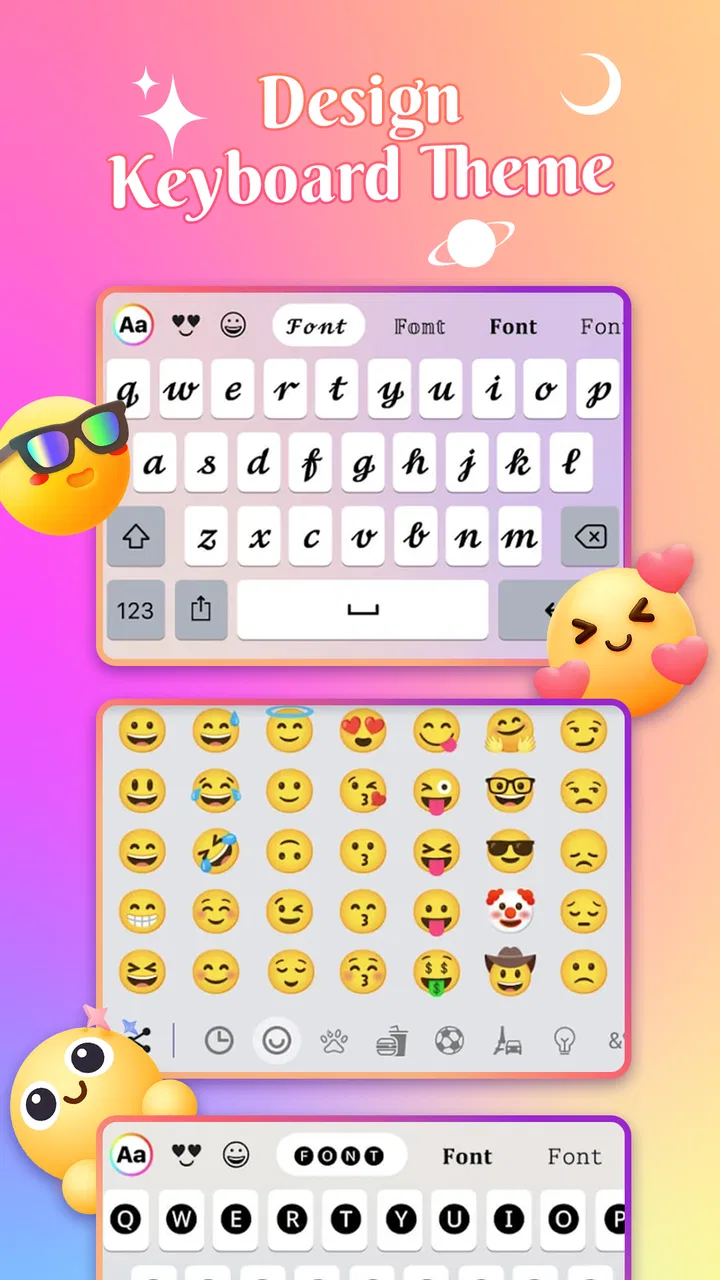
The emoji focus is especially suitable for friendly conversations. I could make a short reply feel warmer without opening a separate emoji application or copying symbols from elsewhere. It is a small convenience, but repeated many times during the day, it makes the keyboard feel more purposeful than a purely decorative theme pack.
The font options are better understood as a style choice for supported typing fields, not as a replacement for the phone's entire system typography. I would use them for captions, profile text, playful messages, or a status update where appearance matters. For work messages, forms, and anything that needs maximum readability, I would stay with a simpler style.
The same distinction applies to themes. A bright or highly decorated keyboard can be fun in a personal chat, yet it may reduce visual clarity when I am typing quickly. I found the most dependable approach was to choose a theme with clear contrast rather than automatically selecting the most elaborate design.
What I would do during initial setup
I would begin with one neutral-looking theme and test it in the apps I use most. A keyboard may appear comfortable in its own preview while feeling different inside a messaging app with a smaller text field. I would type a few sentences, switch between letters and numbers, open the emoji area, and check whether the visual elements still leave enough room for accurate taps.
After that, I would try one more expressive option and compare the two during real typing. This is more useful than choosing from thumbnails alone. The best theme is not necessarily the one that looks most impressive in the selection screen; it is the one that remains readable when I am replying quickly with one hand.
A realistic example is a busy morning when I am answering a family group chat while walking between tasks. I might use the keyboard's emoji access for a quick reaction, but I would not want to hunt through elaborate menus or correct mistakes caused by low-contrast keys. In that situation, a restrained theme wins over a flashy one.
Settings that deserve a deliberate check
Personalization keyboards are easy to install and easy to leave half-configured. I recommend taking a few minutes to inspect the available appearance choices instead of accepting the first style. Look for the combination that gives you a recognizable keyboard layout, readable characters, and an emoji arrangement that does not interrupt normal typing.
I would also check how the keyboard behaves when I need to return to the phone's usual keyboard. That matters for specialist situations, such as entering passwords, working in a business application, or using a language layout that I already know well. A personalization keyboard should be convenient, not a permanent obligation.
Another practical check is whether the selected font remains understandable to other people. Decorative characters can look different across apps and devices, and some styles are harder to scan than ordinary letters. I would reserve the more unusual choices for informal text and keep a plain option ready for anything important.
The app's free price makes experimenting easy, but free does not mean every choice will suit every user. I would judge it by how quickly I can reach a comfortable configuration, not by how many visual variations I can browse. If choosing a theme becomes a daily distraction, the customization is working against the reason to use a keyboard.
It is also worth considering the age rating. Since the app is marked for everyone, it is positioned as a broadly accessible personalization tool rather than something aimed at a narrow adult audience. That does not remove the need for normal judgment when choosing expressive styles for children or shared devices, but it does make the concept easy to understand for a household with different users.
Repeatable shortcuts for faster, calmer use
The most useful habit I developed was separating setup time from typing time. I would explore themes when I had a spare moment, then leave the chosen style alone while working or messaging. This prevents the keyboard from becoming another source of small decisions and lets the emoji and font features serve a clear purpose.
I also found it helpful to create a personal rule for when to use decorative text. For example, I might use a playful font in a social caption but switch to ordinary text for an appointment message. That simple boundary protects readability and avoids sending a style that feels inappropriate for the conversation.
Emoji can be used more efficiently when I think in terms of recurring situations rather than browsing randomly. If I often send quick acknowledgements, celebratory replies, or affectionate messages, I can learn where the relevant emoji are located and reach them without scanning the entire panel. The benefit comes from repetition, not from having an enormous collection open at all times.
For one-handed typing, I would favor a theme with strong separation between keys and avoid visual effects that compete with the letters. I would also type shorter messages in bursts instead of trying to compose a long paragraph while moving around. This is not a special feature of the app; it is a practical way to make a customized keyboard less error-prone.
When writing a longer caption, I would draft the wording first and style it afterward. That workflow keeps the message clear and prevents decorative characters from interrupting thought. It is a small but important trade-off: the app can make the final text more distinctive, but the writing itself should not depend on visual effects.
Where it compares well with ordinary alternatives
The default keyboard on a phone usually wins for familiarity, predictable layout, and quick access to standard typing tools. If I mainly write emails, fill out forms, or use several languages, I would probably keep the default option as my main keyboard. It asks less of me and tends to disappear into the background.
Keyboard Emoji & Sound Themes makes more sense when appearance and expression are part of the reason I am typing. Compared with a plain keyboard, it gives me more room to personalize the visual experience and make emoji a more central part of casual communication. Compared with a general-purpose third-party keyboard, its appeal is more focused: it is not trying to be my complete writing system for every situation.
That focus can be a strength. I do not need a complicated productivity dashboard when I simply want a different look for messages. It can also be a limitation. Users who expect advanced writing assistance, extensive language tools, or a deeply optimized workflow may find a dedicated productivity keyboard more suitable.
I would also compare it with the customization already built into a phone. Some devices offer themes or keyboard adjustments at the system level, and those options may be enough for someone who wants only a dark appearance or a basic color change. This app is more interesting for people who specifically want the combination of emoji-oriented typing, stylish fonts, and themed presentation.
Limits that experienced users should understand
The biggest trade-off is that visual customization can compete with speed. A font that looks attractive in a screenshot may be tiring after several minutes of reading. A theme with many decorative elements may also make the keys feel less immediate. I would not choose a style permanently until I had used it for ordinary conversations and a longer piece of text.
There is another limit in switching contexts. A keyboard that is enjoyable for social messages may not be ideal for a secure entry field, a professional document, or a form where accuracy matters more than personality. I prefer to treat this app as one option in my typing setup rather than assuming it must replace every keyboard on the phone.
Compatibility can also vary by the app where I am typing. Fonts and symbols are not always displayed identically everywhere, so I would check the finished message before sending anything important. If a particular style makes the text difficult to read on another device, the safer choice is ordinary characters.
I would skip this app if I want a completely invisible keyboard, dislike changing visual settings, or need a single tool optimized for serious writing. I would also hesitate if my priority is advanced text correction rather than appearance. In those cases, the familiar system keyboard or a productivity-focused alternative is likely to be a better fit.
On the other hand, I think it is a good match for people who send many casual messages, enjoy changing the look of their phone, and want emoji and typography to feel like part of their personal style. The app is free, so the barrier to trying it is low, but the real test is whether the chosen setup remains comfortable after the novelty fades.
What its growing audience suggests, and what I noticed
The app has a 4.5 average from around 4.7 thousand ratings and has passed one million installs. Those figures suggest that the concept is connecting with a substantial group of Android users, especially people who want a more expressive keyboard experience. I would still treat popularity as a starting point rather than proof that every theme or workflow will suit me.
It has also received 134 written reviews, which gives prospective users more detailed reactions to consider than a score alone. When I evaluate an app like this, I pay attention to whether people discuss everyday comfort, readability, and switching habits rather than only praising the appearance. Those are the details that determine whether a keyboard stays installed.
Because the app was released on January 27, 2026, and is already at version 1.3.4, I see it as a relatively new product that is being developed actively. That can be encouraging for users who enjoy trying a fresh personalization tool, although it also makes it sensible to keep expectations practical and judge the current experience rather than assuming every desired keyboard feature is already present.
My verdict after building a routine around it
I like Keyboard Emoji & Sound Themes most when I use it intentionally: a readable theme for daily typing, a stylish font for selected social text, and emoji access for quick emotional context. That combination gives the app a clear role without forcing every message to look decorated.
My recommendation is therefore conditional but positive. Try it if your keyboard feels dull and you want a simple way to add personality to casual communication. Spend time testing readability, keep an ordinary keyboard available for serious or sensitive tasks, and choose repeatable habits instead of constantly changing the design.
The key lesson is that the best customization is the one that disappears while you type. Once the theme supports your rhythm rather than interrupting it, this personalization app becomes a pleasant daily companion. If you need maximum writing efficiency, broad language support, or advanced composition tools, I would choose a different category of keyboard. For expressive everyday messaging, though, this is a worthwhile free option to explore.
FAQs for Keyboard Emoji & Sound Themes
01What is Keyboard Emoji & Sound Themes and how does it work?
Keyboard Emoji & Sound Themes is a customizable keyboard app that offers a variety of emojis, sound effects, and themes. It allows users to personalize their typing experience by selecting unique keyboard designs and sounds. The app integrates seamlessly with your device, replacing the standard keyboard with a more engaging and fun interface.
02Is Keyboard Emoji & Sound Themes compatible with all devices?
The app is compatible with most Android and iOS devices. However, users should ensure their device meets the minimum operating system requirements for optimal performance. It's recommended to check the app's description on the Google Play Store or Apple App Store to confirm compatibility with your specific device model.
03Does the app impact device performance or battery life?
While Keyboard Emoji & Sound Themes runs smoothly on most devices, it could potentially impact performance or battery life, especially on older models. This is due to the additional animations and sound effects. Users with older devices may want to monitor performance and adjust settings within the app if any issues arise.
04Are there in-app purchases or advertisements?
Yes, Keyboard Emoji & Sound Themes typically includes in-app purchases and advertisements. While the app is free to download, additional themes, emojis, and sound packs might require payment. Ads may appear occasionally but can often be removed with a premium subscription or one-time purchase.
05Is it safe to use Keyboard Emoji & Sound Themes?
The app is generally safe to use, but users should always download it from official app stores like Google Play or Apple App Store to avoid malicious versions. The app does require certain permissions, such as accessing the keyboard settings, so it's important to review these carefully to ensure your data privacy.
Pros
- Wide variety of emoji themes available.
- Customizable keyboard sounds for fun typing.
- Smooth and user-friendly interface.
- Supports multiple languages seamlessly.
- Regular updates with new features.
Cons
- Contains ads that can be intrusive.
- Some themes require in-app purchases.
- Occasional lag on older devices.
- Limited free customization options.
- Requires internet for certain features.

Keyboard Emoji & Sound Themes
Gallery